Zone Manager and Reader Basics
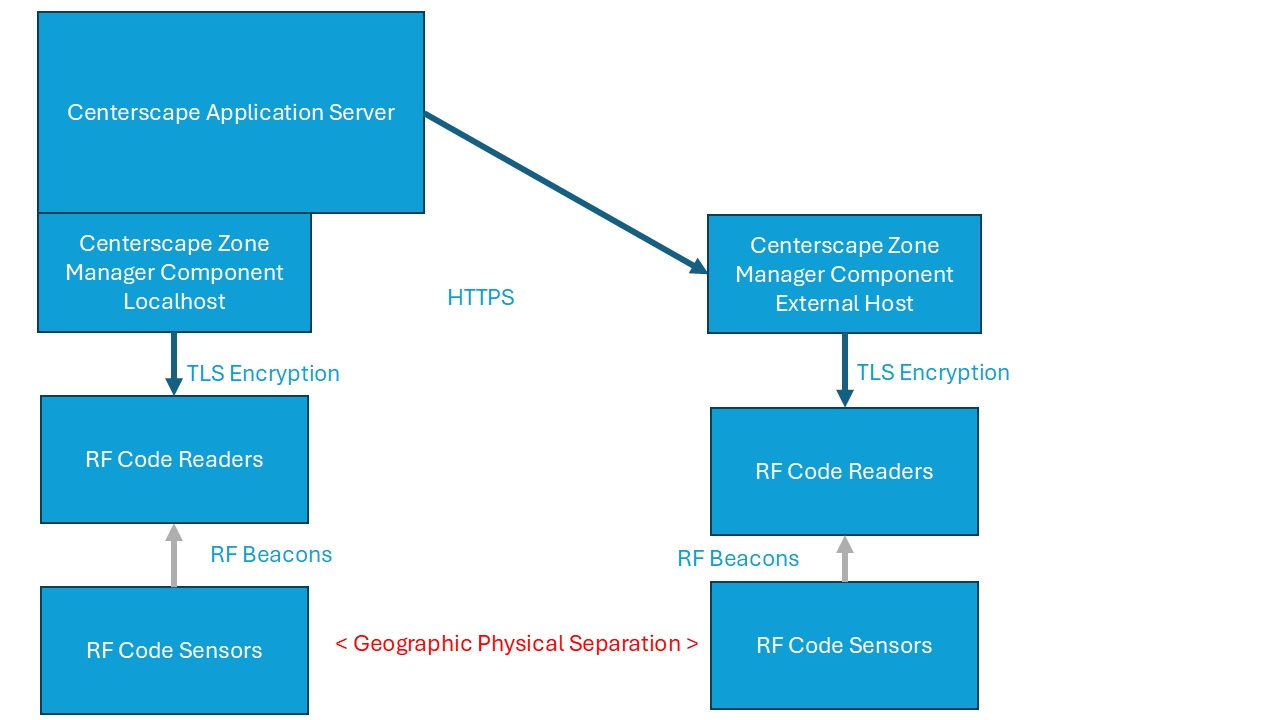
The design of the RF Code Centerscape system Software uses a state engine called "Zone Manager" or "CenterScape Core" to interface with the M250 Readers. The state engine then tracks all the signals received from every tag that a reader assigned to a specific Zone Manager reports. The Arrows in the above graphic indicate how the connection is generally established and not the flow of data through the system. With the exception of the RF Beacons, network data flow is bidirectional. CenterScape configures the Zone Managers and then listens for updates from the state engine. Zone Managers configure each reader with specific radio parameters and then listen for tag updates as the engine determines a change in state such as a new temperature reading or a movement in the tag. Sensors and Asset tags only beacon. They are never aware whether a reader is in proximity and reading their beacons or not.
Reader "Multiplexing"
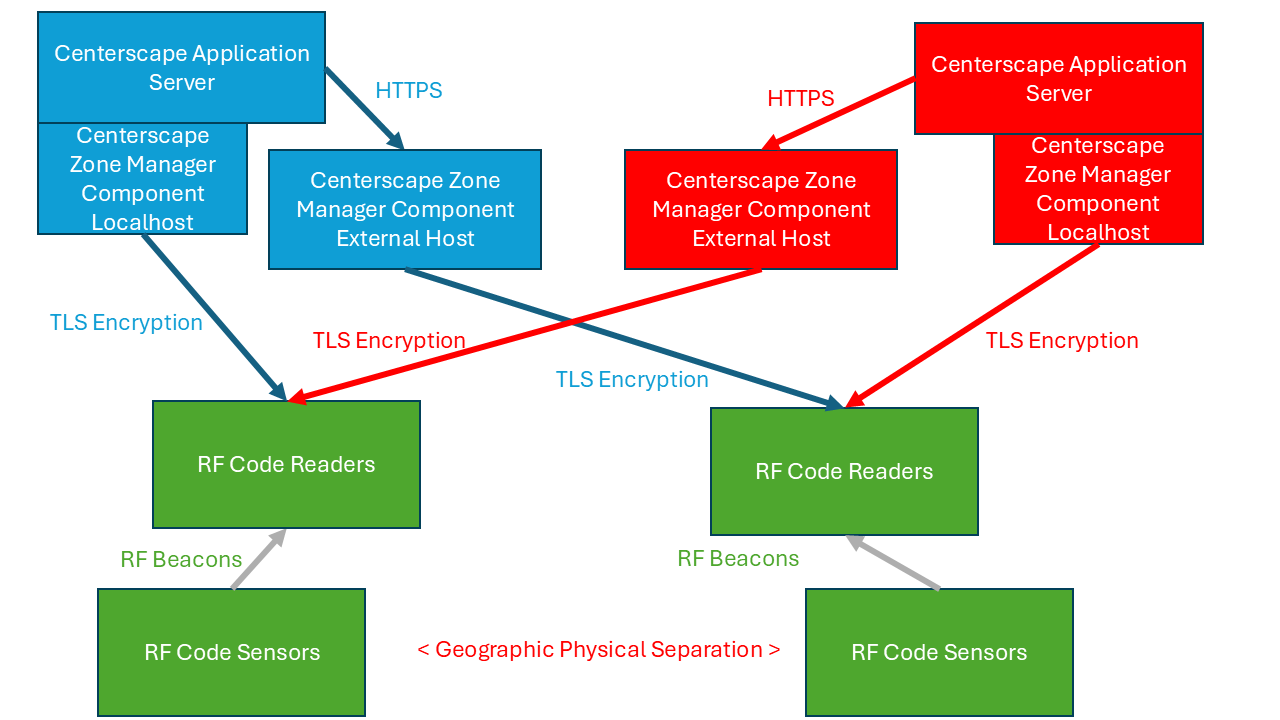
An M250 reader can handle up to 8 concurrent connections. This means they can be used by multiple Zone Managers instances and/or Multiple CenterScape instances. The below graphic shows how a reader and sensor infrastructure can be used by multiple CenterScape instances. The readers and sensors in green as they are a shared resource and will provide a tag stream to any authenticated requestor. They are a shared resource and can be used by multiple Zone Manager instances without those instances being aware of each other.
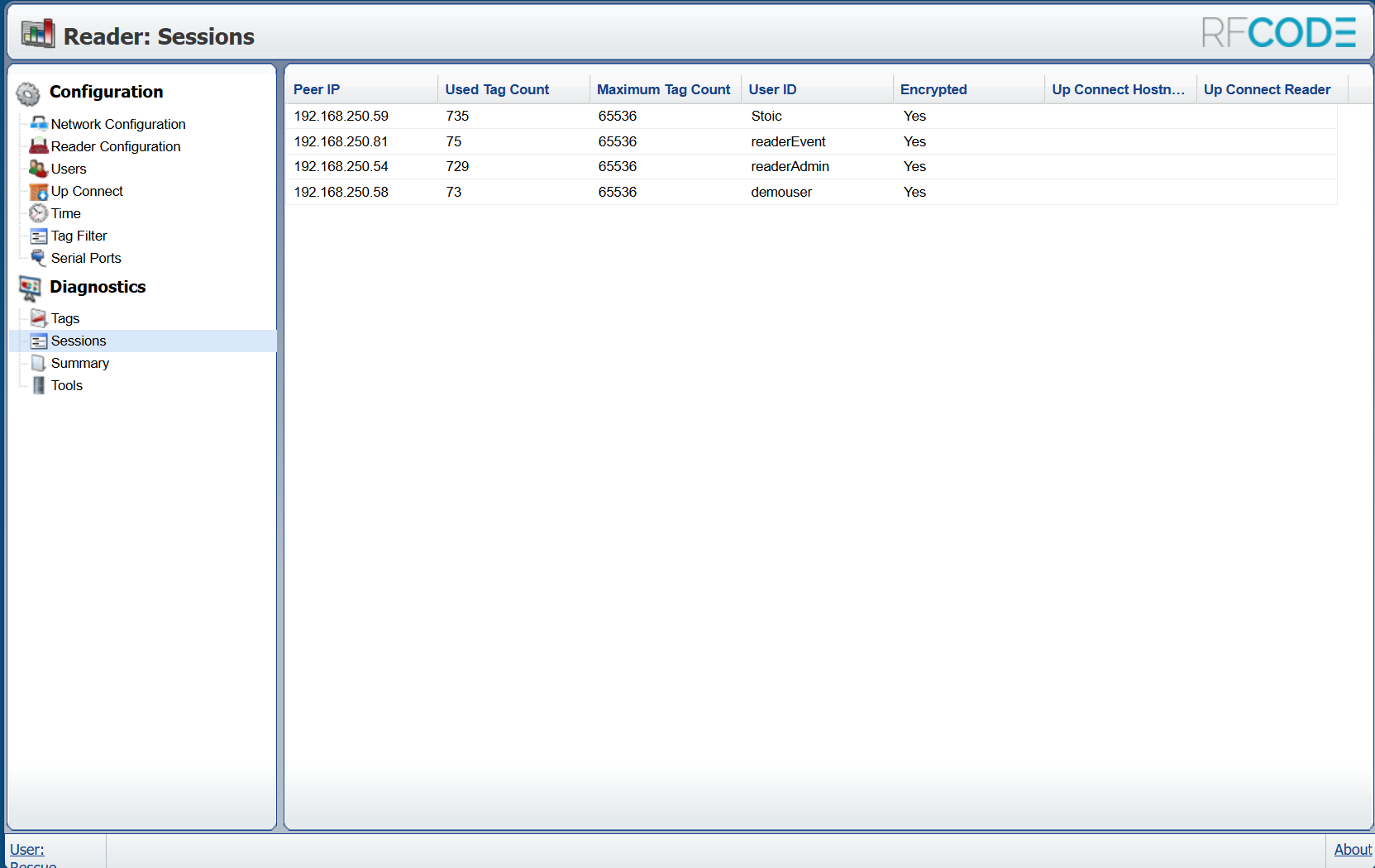
The reader web interface can be used to determine how many sessions a reader is currently servicing, which hosts are connected and requesting a session, and which reader user account each session is authenticating as. Each session connected to a reader does not know of other sessions on the reader. Other sessions have no effect of the session of a connected host. Some sessions can request only specific tag groups and have their own session parameters for tag time out and ssi differential reporting. The operation is simular to a virtual machine where multiple servers share the same piece of hardware without being aware of other servers on that hardware.
Reader Upconnect
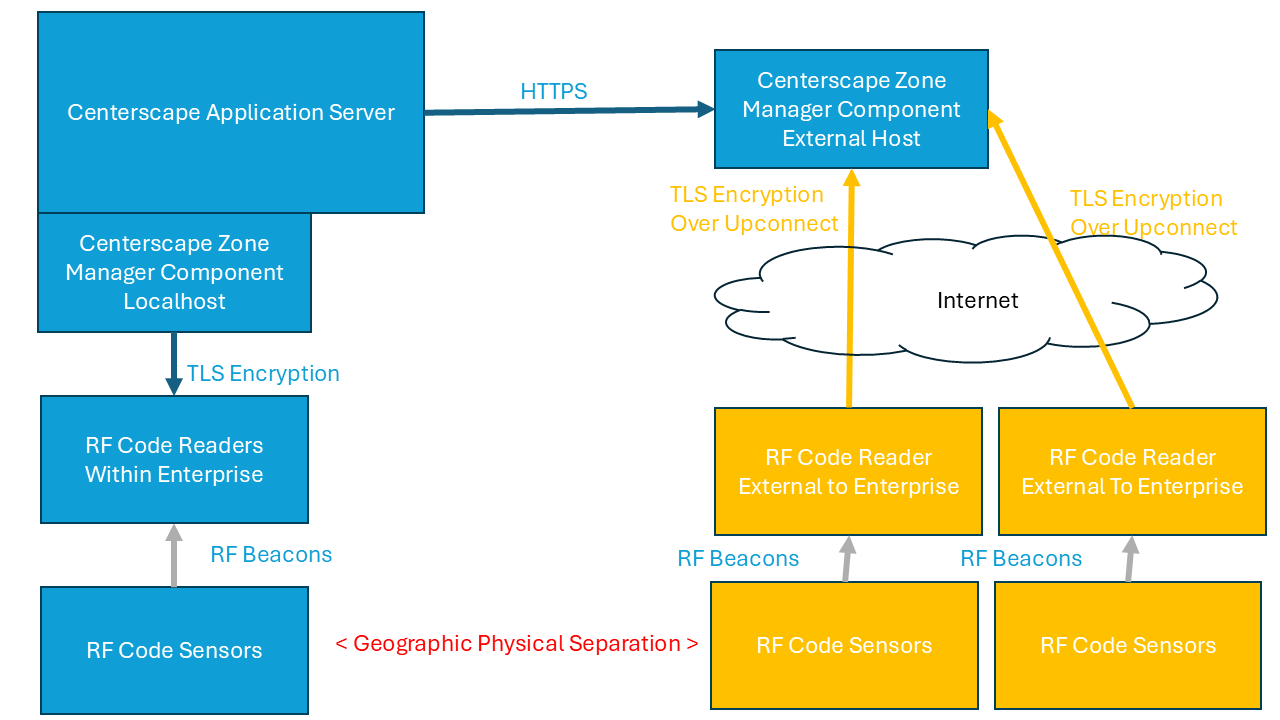
Reader upconnect is a mode of operation where instead of the Zone Manager establishing the connection to the reader, the reader establishes the connection to the Zone Manager. For example if the reader exists on a network not owned by the enterprise that owns the CenterScape/Zone Manager software then the reader can "dial out" to a Zone Manager. RF Code does not recommend using this method as the preferred method of connectivity unless it is the only way a reader can communicate with a Zone Manager. The reason for this is the following:
- Upconnect requires each reader to be configured for the upconnected zone manager. This requires we access to the reader on the remote network to set up the upconnection or update it.
- Upconnect makes multiplexing a "test" instance of Centerscape more difficult since it requires local access to the reader for each test instance.
- Upconnect makes troubleshooting more difficult.
In some cases an enterprise may have the majority of its readers installed within its own network and a few readers installed at shared or vendor sites to track inventory or remote monitoring of environmental data. In these cases a second Zone Manager instance should be used specifically for the purpose of allowing upconnect. Below is a recommended setup when using the upconnect function.
Multiple Zone Managers With Centerscape
CenterScape includes a Zone Manager as part of its installation. The "Local Zone Manager" is part of the service JVM that runs CenterScape as a second application that shares resource with the CenterScape application. The location rules and tag stream processing engine of Zone Manager is memory efficient and multithreaded though the coalescing of tag beacons from multiple sources into a single result is a single threaded operation. The Local Zone manager instance can handle hundreds of thousands of asset tags and sensors as well as a thousand M250 readers or more. There is no hard coded boundary limit to what a single Zone Manager can process.
The main reasons for additional Zone Manager installs are as follows:
- There are more than 10,000 IR Codes that need to be used. RF Code asset tracking hardware is limited to 10,000 IR Codes, so there is roughly a 10,000 cabinet limit for a single Zone Manager instance though in practice those 10,000 codes are also used by room locators and 0001 should not be used so it is generally 9800. An additional Zone Manager can be added and IR Rules directed to the additional Zone Manager for a "realm" of another 10,000 IR Codes.
- If the readers and zone managers are in different parts of the world then colocating a Zone Manager can reduce the amount of network traffic. Zone Manager updates to CenterScape are a small fraction of the network bandwidth that occurs between Readers and Zone Manager.
- Certain integrations like the SNMP Bridge, OPC Framework, and MQTT Bridge interface with Zone Manager. In these cases a closed loop can be established at a local site where the consumer, typically a Building Management System (BMS) is consuming the data. If network access between the site and CenterScape is lost, the BMS will still have access to sensor data from Zone Manager as long as the bridge software is also colocated at the site.